Ting
macOS 14+ · Apple silicon and IntelYour next app. A few keys away.
A leader-key launcher for macOS. Press your leader key, then a key or short sequence to open an app or URL, or to start a small micro-app. Home, then w, g — and you’re on GitHub. Double-tap the leader to search apps with launcha.
Signed with Developer ID and notarized by Apple.
Currently distributed through GitHub Releases.
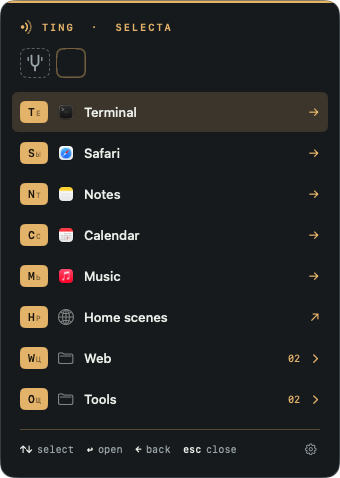
Press the leader, then one key. 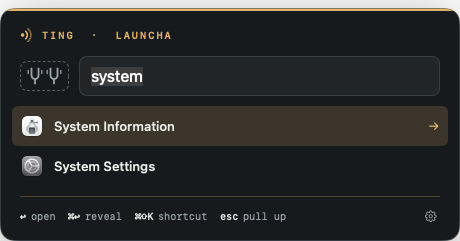
Double-tap the leader to search apps. 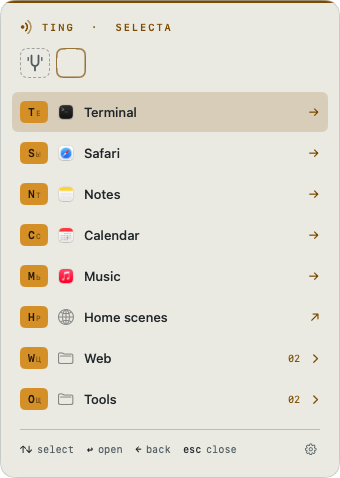
Light or dark, as you like. 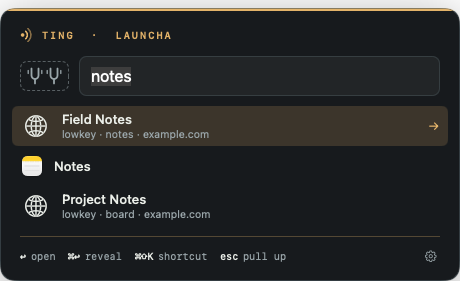
Your lowkey sites, alongside apps. 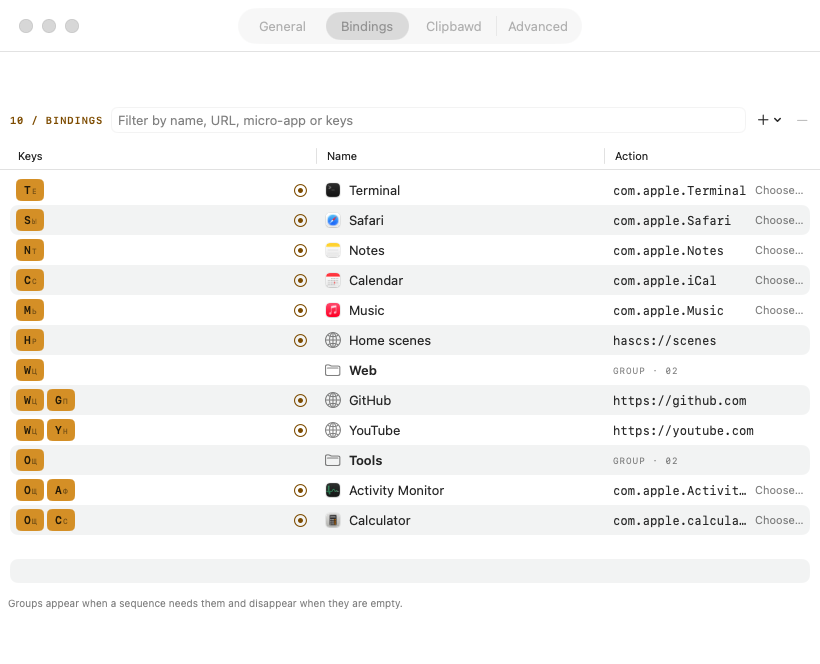
Every sequence in one table.
Ting 0.7.19: 18 color themes and 10-color customization
Settings › General › Appearance now offers System, Light, and Dark modes, 18 built-in palettes with swatches (Amber, Catppuccin, Kanagawa, Tokyo Night, Everforest, Flexoki, Nord, Dracula, GitHub, and more), 10 customizable color roles under Panel/Accent/Text and More colors with Auto reset, and a live preview across selecta, launcha, Clipbawd, and Settings.
Ting 0.7.18: fuzzy search, Clipbawd image previews and ⌘, Settings
launcha now supports fuzzy search with typo tolerance, highlights matched letters, and offers opt-in Rank by apps you use. Clipbawd previews copied PNG and JPEG files, and ⌘, opens Settings from selecta, launcha or Clipbawd on any layout.
Ting 0.7.17: searchable settings and clipboard storage
New in this release: a resizable Settings sidebar with search, a shorter menu, opt-in clipboard history (100 entries, 50 MiB, 30 days by default), Markdown coloring and video thumbnails for clips up to 30 seconds.
Ting 0.7.16
The release notes and the signed download are available on GitHub Releases.
All updates34
Ting 0.7.15
Switch keyboards without changing your shortcuts. Either leader opens the same selecta bindings.
Ting 0.7.14
launcha now finds Finder and Safari. You can search by the app’s display name or its .app filename.
Ting 0.7.13
Open Ting and choose Check for Updates… to install this release.
Ting 0.7.12
Open Ting and choose Check for Updates… to install this release.
Ting 0.7.11: menu and launch timing
Selecta appears immediately by default. Ting sends the app launch request before playing the sound.
Ting 0.7.10: reopen 1Password
Select 1Password to show its window even if the app is already running with its main window closed.
Ting 0.7.9: lowkey actions and previews
Micro-apps can control one saved lowkey site by alias, inspect its page or fill a field. Use preview to review the previous step’s output before continuing.
Ting 0.7.8: lowkey sites, shared UI and Purr
When lowkey is installed, add Open or Toggle site bindings through Settings › Bindings › + › lowkey. Launcha finds sites by title, alias or host alongside apps. BobukKit supplies shared rows, panel frames and wrapping shortcut hints. Purr is the new default sound; an explicitly selected sound stays unchanged.
Ting 0.7.7: new bindings start empty
Adding a binding no longer assigns A or another free key in advance. Record your keys and click Done to save. Cancel or Escape discards the draft without adding a binding. Existing bindings keep their current keys when you edit them.
Ting 0.7.6: Clipbawd and clipboard history in micro-apps
Search for Clipbawd in launcha to open session-only clipboard history. Single-click previews; Return or double-click pastes, Command-Return copies, Shift-Command-Delete removes. Set an optional hotkey or bind it in selecta. Approved micro-apps read a fixed snapshot with ${clipboard[-1]}, ${clipboard[-2]} and earlier negative indices.
Ting 0.7.5: App shortcuts, markdown links and a converter
Press Command-Shift-K in launcha to assign a global shortcut to an app. It opens that exact app; the leader and launcha shortcuts stay protected. Micro-app markdown results can include links, with a warning before the first one opens. The launcha converter handles units, number bases, Unix time and dates.
Ting 0.7.4: Interactive micro-apps
An ask step requests text during a run; choose filters a list and passes the selected value to the next step. Esc cancels, waiting pauses timeouts, and answers are not remembered. Settings also lets you choose the macOS open sound and its volume.
Ting 0.7.4: Homebrew updates
A copy installed with Homebrew no longer runs Sparkle. Its menu and Settings offer Update Ting via Homebrew… instead: Ting runs brew upgrade --cask --greedy bobuk-io/tap/ting, shows brew’s output and the result, and starts again.
Ting 0.7.3: Launcher menu
A small gear in the bottom-right corner of selecta and launcha opens the same menu as the menu-bar icon, including Settings and Check for Updates. It works even when the menu-bar icon is hidden.
Ting 0.7.2: Selecta keyboard fix
Selecta now lets arrow keys and Return reach menu navigation instead of consuming them as key equivalents. Command shortcuts remain blocked while the menu is open.
Ting 0.7.1: Keyboard navigation and panel outlines
Use arrow keys and Return in selecta. Launcha navigation works outside the search field and keeps the selection visible after refresh. The amber top rule follows each panel’s rounded outline.
Ting 0.7.0: a calculator in launcha
Type digits and an operator, such as 2*(3+4), 1,5 × 4 or 200 + 15%: the value comes first in launcha, and Return copies it. Ting computes it itself, with decimal numbers, so 0.1 + 0.2 is 0.3. Turn it off with Calculate in launcha in Settings. Updates are now checked at bobuk.io.
Ting 0.6.1: an Accessibility window
When a micro-app needs Accessibility and Ting does not have it, Ting opens a window instead of an error: Open Accessibility Settings goes to the right pane of System Settings, and the Ting icon in the window drags straight into its list. The window closes by itself once access is on. Settings › Advanced shows the state.
Ting 0.6.0: context and typing
A micro-app can read what you were working on: the active app, the files selected in Finder, the browser tab, the selected text and the front window, but only what its file lists in context:. keys and paste steps press keys and paste text in the app you came from, and output to: [app] puts the result in place of the selection. The approval panel shows what a micro-app reads and sends.
Ting 0.5.1: faster menu and switching
App icons are preloaded and app paths cached when bindings load. Already running apps activate directly, before the menu hides. The menu view is reused, its window fits the content and uses the system shadow. Space and other keys without a layout hint now have the same minimum keycap width, so rows line up.
Ting 0.5.0: steps and libraries
A micro-app can now be a list of steps: shell or Python code, HTTP requests, AI calls (OpenAI, Anthropic or a local server such as Ollama), text, JSON fields, opening a URL and notifications, piped one into the next. Shared steps live once in libraries. The ting-micro console tool checks and runs micro-apps, and a coding agent can now add your bindings too.
Ting 0.4.0: micro-apps
A micro-app is one YAML file that runs one shell command: it can ask for a few parameters, read the clipboard and show or copy the result. Bind a key to it or start it from launcha. Ting runs it only after you approve the exact file. Copy Agent Prompt hands Claude Code, Codex or pi what they need to write one, and Ting --check checks the file.
Ting 0.3.3: a quieter “ting”
The sound Ting plays when it opens an app, link or file is now half as loud. Turn it off in Settings → General with Play a “ting” when opening an app, link or file.
Ting 0.3.2: complete app list
launcha now scans every app in its folders, however large or deeply nested, and no longer shows scan-limit notices.
Ting 0.3.1: closer selecta spacing
With the panel title hidden, the leader-key row now sits closer to the amber top rule, matching launcha.
New in 0.3.0: launcha
Double-tap the leader to search apps, or set a separate hotkey. Results rank by successful Ting launches over the last seven days. When no app matches, Spotlight searches indexed files in your home folder, subject to folder consent. Use Check for Updates… in Ting to upgrade.
One key to begin
Choose any non-modifier key, alone or with modifiers: Home, F13, or Option-Shift-Command-F. A modifier alone cannot be the leader. There is no default: Ting asks you on first launch.
A small menu, when you need it
Organize nested groups such as Apps and Web. Use letters, digits, Space, Return, and F-keys. Esc closes the menu; Delete goes back a level. Type quickly and the menu stays out of the way: its delay defaults to 0.25 s.
Keep your keyboard layout
Bindings use the Latin letter of each key and work with any layout, including Russian and Ukrainian. The menu shows the current layout’s letter as a small hint beside it.
Your bindings, your file
Edit ~/.config/ting/config.json by hand, keep it in dotfiles, or use Settings. Ting reloads changes automatically. Apps open or come to the front; URLs open in the default app, including schemes such as raycast://.
Quick start
A little setup. Back to your day.
macOS 14+ · Apple silicon and Intel. Universal ZIP for Apple Silicon and Intel, with a SHA-256 checksum file. Menu-bar only, with no Dock icon. The interface is English only.
View the latest release ↗01Install with Homebrew
The official tap installs the signed, notarized universal app. If Homebrew asks for trust, run brew trust --cask bobuk-io/tap/ting and repeat. Open /Applications/Ting.app after installation. To update with Homebrew, quit Ting and run brew upgrade --cask --greedy bobuk-io/tap/ting, then reopen it; built-in updates also work.
brew install --cask bobuk-io/tap/ting02Or download the ZIP
Download the latest release ZIP from GitHub, unzip it, and move Ting.app to /Applications. Releases are signed with Developer ID and notarized by Apple.
03Choose your leader
Open Ting and press the key you want to use as your leader. The leader needs no Accessibility or Input Monitoring permission: Ting uses the standard macOS hotkey API.
04Make it yours
In Settings → Bindings, record key sequences and finish with Done. Missing groups are created and empty groups removed automatically. You can also edit ~/.config/ting/config.json directly.
Good to know
Can a Ting micro-app work with an open lowkey site?
Yes, in builds with the native lowkey step and the lowkeyctl helper. Use a saved alias to inspect controls, wait for a button, fill a field or attach a file. Ting 0.7.16 and lowkey 0.1.2 add action: save-pdf with a file: path to export the whole current document using print styles, without overwriting existing files. See the Micro-apps guide for a read-only example.
What is Clipbawd in Ting 0.7.6?
Ting 0.7.6 adds Clipbawd, a clipboard history. Search for Clipbawd in launcha, bind it in selecta, or assign an optional hotkey. History lives in memory for this session only. Use Clipbawd turns recording off and clears it. Approved micro-apps can read ${clipboard[-1]} for the newest item and ${clipboard[-2]} for the preceding item, from a fixed snapshot. Text, links and colors give text; files give paths. Images, missing entries and disabled history fail explicitly. Pass history to shell commands through env:, not code interpolation. Secret-marked copies are excluded; private-window detection is limited and does not cover Safari. Link previews are off by default; enabling them makes network requests.
How do I set a global shortcut for an app?
In launcha, select an app and press Command-Shift-K, or open its context menu and choose Set Global Shortcut…. Record a key or combination, then press Return or Save. The shortcut opens that exact app bundle even when launcha is closed. A new assignment replaces that app’s old shortcut; before taking the same key from another app, Ting asks you to confirm. The leader and launcha shortcuts are reserved. Use Record Again, Remove Global Shortcut or Esc to change, remove or cancel. If macOS reports a conflict or saving fails, the old shortcut stays. Shortcuts are stored under appHotkeys in config.json.
Do I need special permissions?
The leader and launcha need no Accessibility or Input Monitoring access. Since 0.6.0 a micro-app that reads the selected text or the front window, presses keys or pastes into an app needs Accessibility, and one that reads the Finder selection or the browser tab needs Automation for that app; Ting asks only then. Since 0.6.1, without Accessibility Ting opens a window that shows how to allow it. launcha skips Desktop, Documents and Downloads until you explicitly allow access; macOS may then request folder permissions.
Can I run shell commands?
Yes, from micro-apps since 0.4.0: YAML files in ~/.config/ting/micro/. Ting runs a command only after you approve the exact file content, as your user with your full rights, for 60 seconds by default and at most 300. Since 0.5.0 a micro-app can also run Python, HTTP requests and AI calls as steps, and since 0.6.0 it can read the active app, the Finder selection, the browser tab or the selected text and paste its result into the app. App and URL bindings run no commands; config.json holds no code.
Does it work with Russian and Ukrainian layouts?
Yes. Bindings are stored by Latin key letter, with a small current-layout hint in the menu. You don’t need to switch layouts.
How is it different from Spotlight?
selecta opens your fixed sequences without search; fast sequences skip the menu. launcha adds app-name search, ranked by use through Ting. Spotlight file search is a fallback only when no app matches. Since 0.7.0 launcha also calculates: type 2*(3+4) and press Return to copy 14.
Is it in the App Store?
No. Install with Homebrew from bobuk-io/tap/ting or download the universal ZIP from GitHub Releases. Built-in Sparkle updates read the feed at bobuk.io (Ting 0.6.1 and older: the GitHub release feed) and download releases from GitHub.
Why Ting?
“Ting” means “thing” in Jamaican patois and London slang. Amber keycaps, a graphite panel, and “pull up” / “rewind” hints give the menu a light nod to grime and sound-system culture.